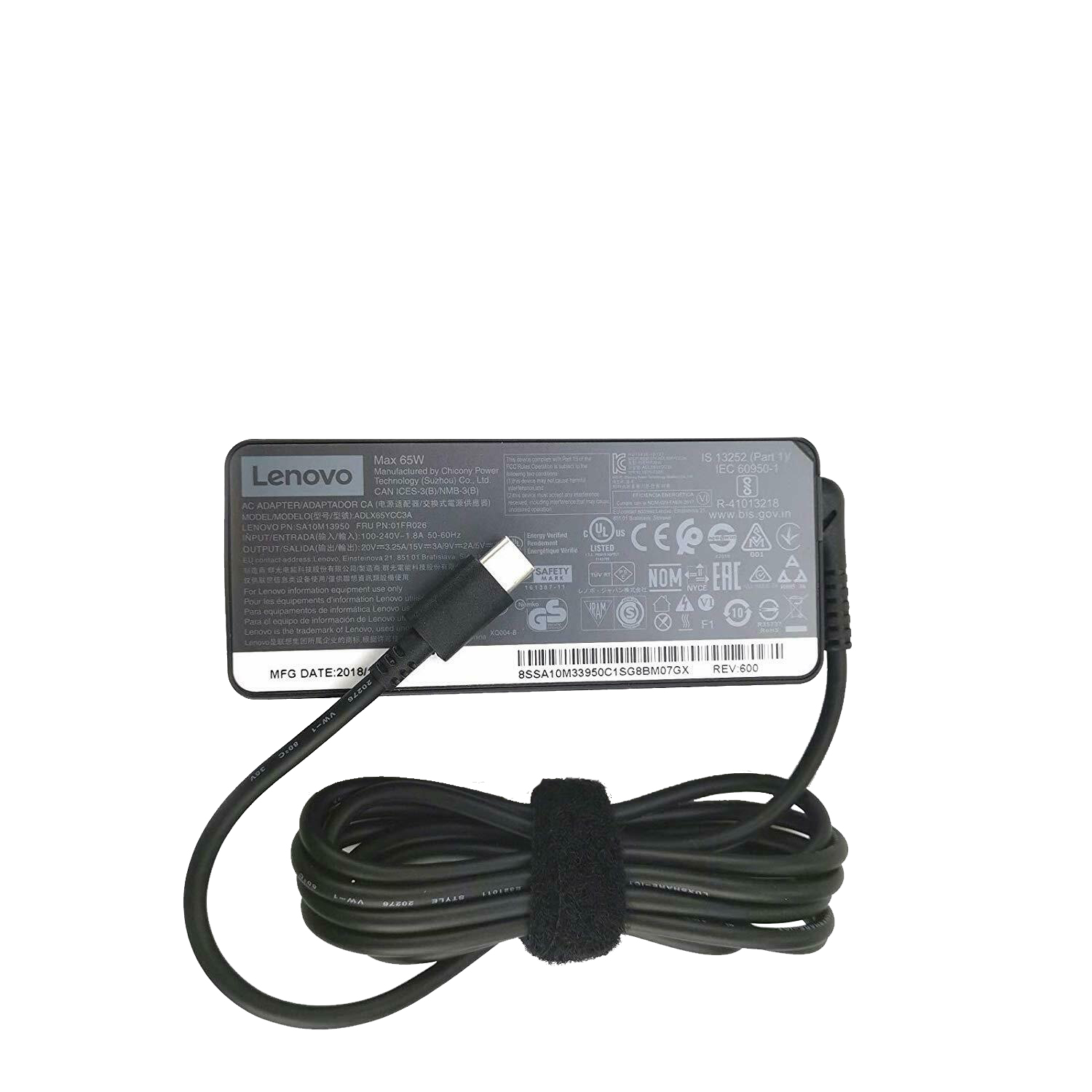

INEXEWOC Universal 65W USB C Laptop Charger Compatible with Lenovo,HP, Dell, Acer, Asus, Samsung, Google and More, for Office, School, and Family
Buy on Amazon →INEXEWOC 65W USB-C Laptop Charger: Universal Power Done Right?

If you've ever found yourself hunting for a replacement charger while juggling a Lenovo, an HP, and a Dell under the same roof — or just need a reliable backup for school or travel — the INEXEWOC 65W USB-C charger is exactly the kind of quiet, unglamorous solution that just works. It's not exciting. But sometimes that's exactly what you want.
What It Actually Does
This charger delivers 65W over USB-C — the sweet spot for modern thin-and-light laptops. To put that in context: the ASUS Zenbook 14 reviewed by a longtime r/laptops user ships with a 65W USB-C charger as its standard in-box accessory. That's not a coincidence. 65W is enough to charge a laptop during normal productivity use, keep pace with light workloads, and top up overnight without drama. You're not going to charge a gaming rig mid-session, but for Chromebooks, ultrabooks, and mid-range office laptops, it's the right number.
The "universal" claim holds up reasonably well. Brands like Lenovo, HP, Dell, Acer, Asus, Samsung, and Google are all listed as compatible — covering a huge chunk of the mainstream USB-C laptop market. As long as your laptop accepts USB-C power delivery (and most made after 2019 do), this charger should work.

Who This Is Actually For
The use cases here are more obvious than you might think. Students bouncing between dorms and classrooms. Remote workers who want a charger at the office without lugging the original one back and forth. Families with multiple USB-C laptops who are tired of keeping track of three different bricks. And anyone who's lost or damaged their OEM charger and doesn't want to pay the brand-premium for a replacement.
The 65W output is particularly well-matched to the current generation of efficiency-focused laptops. Machines running Intel Lunar Lake or AMD Ryzen AI chips — the kind discussed extensively in laptop-buying threads — typically ship with 45W to 65W chargers. So this covers that entire category neatly.
What to Be Aware Of Before Buying
Third-party chargers live and die by one thing: safety certification. For a USB-C power delivery charger at this wattage, you want to confirm it carries proper PD (Power Delivery) protocol support and legitimate safety certs. A laptop that accepts 65W won't be damaged by a charger rated at 65W — the device negotiates what it draws — but a poorly made charger can degrade over time or run hot.
Also worth noting: this won't replace a proprietary barrel-connector charger. If your older Lenovo or Dell uses a round pin connector rather than USB-C, this isn't your solution. Check your laptop's ports first.

For users with higher-demand machines — think a 14-inch laptop running video editing software, or a system with a discrete GPU — a 65W charger will charge slowly under load, or may only maintain battery level rather than gaining charge. One r/laptops reviewer noted their intensive tasks like DaVinci Resolve editing required keeping the charger plugged in, and even then, a higher-wattage option would charge faster during those sessions. If that's your use case, consider a 100W USB-C charger instead.
The Value Equation
OEM replacement chargers from Lenovo, Dell, or HP can run $40–$70. A third-party 65W USB-C option at a significantly lower price point, assuming it performs reliably, is a genuinely smart buy for most everyday users. The INEXEWOC positions itself exactly there — not trying to compete with premium GaN chargers from Anker or Ugreen on compactness or feature set, but offering a practical, affordable alternative for standard charging needs.

For the student with a school-issued HP, the teacher keeping an Acer going through back-to-back classes, or the family with a mixed-brand laptop drawer — this does the job without requiring much thought. That's not nothing.
Frequently Asked Questions
Q: Will the INEXEWOC 65W charger work with my laptop?
A: It is compatible with any laptop that supports USB-C Power Delivery charging, including models from Lenovo, HP, Dell, Acer, Asus, Samsung, and Google. Check that your laptop has a USB-C charging port before purchasing — it will not work with older proprietary barrel-connector ports.
Q: Is 65W enough to charge my laptop while using it?
A: For light to moderate productivity tasks, yes. At 65W you can comfortably charge during office work, browsing, and video calls. For intensive tasks like video editing or gaming, charging may be slower or the battery may hold steady rather than gain charge — in those cases, a 100W charger would be more suitable.
Q: Is a third-party USB-C charger safe to use with my laptop?
A: USB-C Power Delivery is a standardized protocol, meaning your laptop negotiates the wattage it draws — so a properly certified 65W charger won't "overcharge" your device. Look for PD certification and standard safety markings on the product before use.
Q: How does this compare to the original charger that came with my laptop?
A: For most users, day-to-day performance will be indistinguishable. OEM chargers can cost $40–$70 from brand stores; a compatible third-party option at a lower price point is a practical alternative, especially as a backup or travel charger.
Q: Can I use this charger for multiple different laptops?
A: Yes — that's the core appeal. One charger can serve multiple USB-C laptops from different brands, making it especially useful for families or offices with mixed-brand devices.
Posted on March 11, 2026